
How to Withdraw Your Earnings from Play Rupees Game
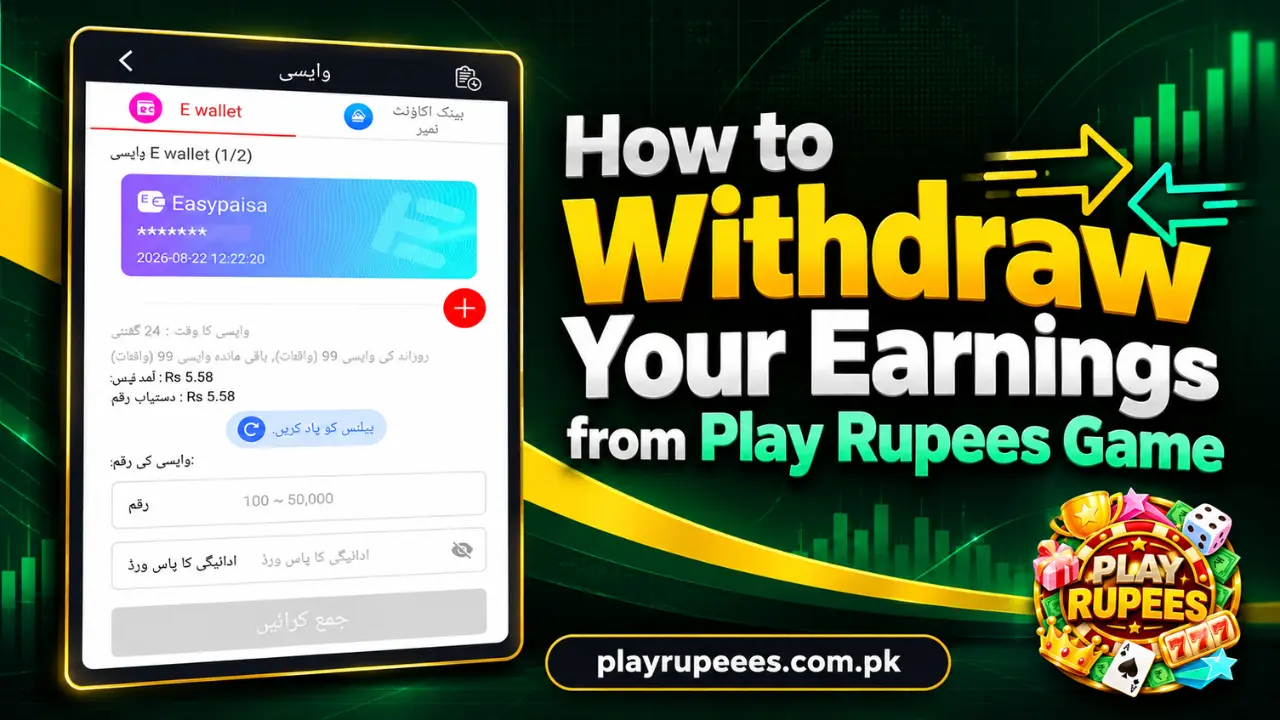
To withdraw money from Play Rupees Game, log in, open Wallet or Withdraw, check your available balance, and choose JazzCash or Easypaisa. Enter the amount and your receiving wallet number, then review both before confirming. Save the withdrawal reference so you can track the request.
Check Your Balance First
Look at the available withdrawal balance, not just the total number shown in your wallet. A bonus or other balance can have conditions attached to it. The amount you request must also meet the minimum shown on the Withdraw screen.
No fixed minimum withdrawal amount is given in the available information. Check the figure inside your account before submitting a request.
Have your own JazzCash or Easypaisa number ready and make sure you can log in to that wallet to check for the payment. Keep your internet connection working while you submit the form.
How to Withdraw from Play Rupees
Do not treat a submitted request as a completed payment. Check its status in Play Rupees and confirm that the money has reached your JazzCash or Easypaisa wallet.
JazzCash or Easypaisa
| Method | Before you submit | After you submit |
|---|---|---|
| JazzCash | Check your JazzCash mobile number digit by digit. | Look for the request in Play Rupees and the payment in JazzCash. |
| Easypaisa | Check the Easypaisa number entered in the form. | Look for the request in Play Rupees and the payment in Easypaisa. |
| Choose only a method shown on your Withdraw screen. If your preferred option is missing, do not put its number into a field for another payment method. | ||
| A wrong number is much easier to fix before you tap Submit. If you notice an error afterward, check the request status and contact Play Rupees support promptly with the withdrawal reference. Do not assume you can change the receiving number once processing has started. | ||
How Long Does a Withdrawal Take?
Check the processing time shown on the withdrawal page or in your confirmation message. Withdrawal descriptions differ: some call the payment quick, while another gives a few hours to one day. Your request status and the time displayed in your account are the useful details to follow.
If the request is still pending after 30–60 minutes, refresh its status. That does not mean the payment has failed or that it is already overdue. If the processing period shown for your request passes without payment, contact support with the amount, date, method and reference number.
Avoid submitting the same withdrawal again while the first is pending. Check what happened to that request before creating another one.
Withdrawal Pending, Failed or Missing?
| What you find | What to do next |
|---|---|
| Withdraw button does not work | Check for an empty field, an amount below the minimum or an error message on the form. |
| Available amount is less than your total balance | Check whether part of the balance is bonus credit or has withdrawal conditions. |
| Request shows pending | Check withdrawal history, save the reference and wait for the processing period shown in your account. |
| Request shows failed or returned | Read the reason displayed. Recheck the amount and receiving details before trying again. |
| Play Rupees shows complete, but your wallet has no payment | Check the receiving number and your JazzCash or Easypaisa history, then report the transaction reference to support. |
| Money left your Play Rupees balance, but there is no clear status | Check transaction history before sending another request. Keep a record of the amount and time. |
| If a request fails, correct the problem shown before trying again. Repeating the same amount and details without checking the error is unlikely to help. | |
Keep Your Withdrawal Details Safe
Save the request amount, date, payment method and transaction reference until the money arrives. Those details help support find the correct payment.
Never give anyone your Play Rupees password, OTP, JazzCash PIN or Easypaisa PIN to “release” a withdrawal. Use the support option available through your account, and share only the transaction information needed to explain the problem.